
Ten formats cover almost every corporate video need: brand films, promos, product demos, explainers, testimonials, social clips, event recaps, training modules, internal comms, and recruitment videos. The right way to sort them isn't by production style. It's by the job each one does: outward-facing types build awareness and drive sales, inward-facing types train, retain, and hire your people. Pick the goal first, then the format, and the rest of this guide walks through definitions, budgets, and how to choose your first project.
TL;DR:
- Choosing the wrong video format for your KPI can lead to wasted budget if you do not define your goal first, such as awareness, leads, or hiring.
- Outward-facing videos like brand films and social clips are best for brand recognition and top-of-funnel growth, while inward-facing formats like training and internal comms focus on employee engagement and retention.
- Budget levels depend on production complexity, with high-tier videos including multi-camera setups and professional color grading, and shorter formats generally matching shorter attention spans on specific platforms.
- One shoot can produce multiple deliverables if you plan for captioning, aspect ratios, and social cuts upfront to maximize content reuse across formats and platforms.
- Matching creative approach and format to the video's purpose ensures authenticity and effectiveness, such as animation for complex explainers and real environments for testimonials.
The Main Corporate Video Types and What Each One Does
Every format below answers to a different KPI, lives on a different platform, and carries its own production demands. Grouping them by who they serve, outward or inward, makes the decision process far simpler than sorting by "style" alone.
- Brand film. Builds emotional recognition and shareability. Lives on the homepage and YouTube. Runs from about one to a few minutes. Higher budget tier. Needs a strong narrative arc and usually a director with a real point of view, not just a camera operator.
- Promotional/ad video. Drives short-term sales or campaign response. Lives on paid social and YouTube pre-roll. Runs from about a few seconds up to one minute. Mid budget. Needs tight scripting since every second costs media spend.
- Product demo. Moves qualified leads toward a purchase decision. Lives on product pages and sales decks. Runs 2 to 10 minutes. Mid to high budget. Needs a working product and someone who can narrate features without sounding like a manual.
- Explainer video. Reduces confusion and support tickets for a complex offer. Lives on landing pages and onboarding emails. Runs about one to two minutes. Low to mid budget. Often animated, which sidesteps the need for talent or location shoots.
- Testimonial/case study. Builds trust at the bottom of the funnel. Lives on sales pages and in outbound decks. Runs roughly one to a few minutes. Low to mid budget. Requires a signed release from the client and enough b-roll to avoid a static talking head.
- Social/short-form. Grows reach and top-of-funnel awareness. Lives on Instagram, TikTok, and LinkedIn. Runs from a few seconds up to around forty-five seconds. Low budget per clip, though volume adds up. Best planned as a byproduct of a larger shoot, not a standalone production.
- Event recap. Extends the life of a single event and proves ROI to stakeholders. Lives on social and internal newsletters. Runs about one to one and a half minutes. Low to mid budget. Needs multi-camera coverage on the day since there's no reshoot.
- Training/onboarding. Moves completion rates and reduces ramp time. Lives on an LMS or internal wiki. Runs 2 to 30 minutes per module. Low to mid budget. Needs a subject-matter expert on camera or as a script consultant.
- Internal communications. Moves employee comprehension of a policy or change. Lives on intranet or Slack/Teams. Runs about one to a few minutes. Low budget. Needs fast turnaround more than production polish.
- Recruitment/culture. Moves applicant quality and offer acceptance rates. Lives on careers pages and LinkedIn. Runs roughly one to a few minutes. Mid budget. Needs real employees, not actors, or it reads as fake immediately.
Which Video Type Should You Make First?
Most companies skip straight to "let's make a brand film" without asking what it's supposed to fix. Studio Binder's producer guidance calls the alternative "budget bleeding": spending on the wrong format for the goal, then wondering why the video didn't move anything.
Use this rubric instead:
- Define the KPI first. Are you trying to move awareness, leads, conversion, hires, or onboarding speed? Write the metric down before anyone touches a camera.
- Pick the format that hits that KPI directly. Awareness pairs with brand film or social clips. Leads pair with explainer or demo. Conversion pairs with testimonial. Hiring pairs with recruitment/culture. Onboarding pairs with training modules.
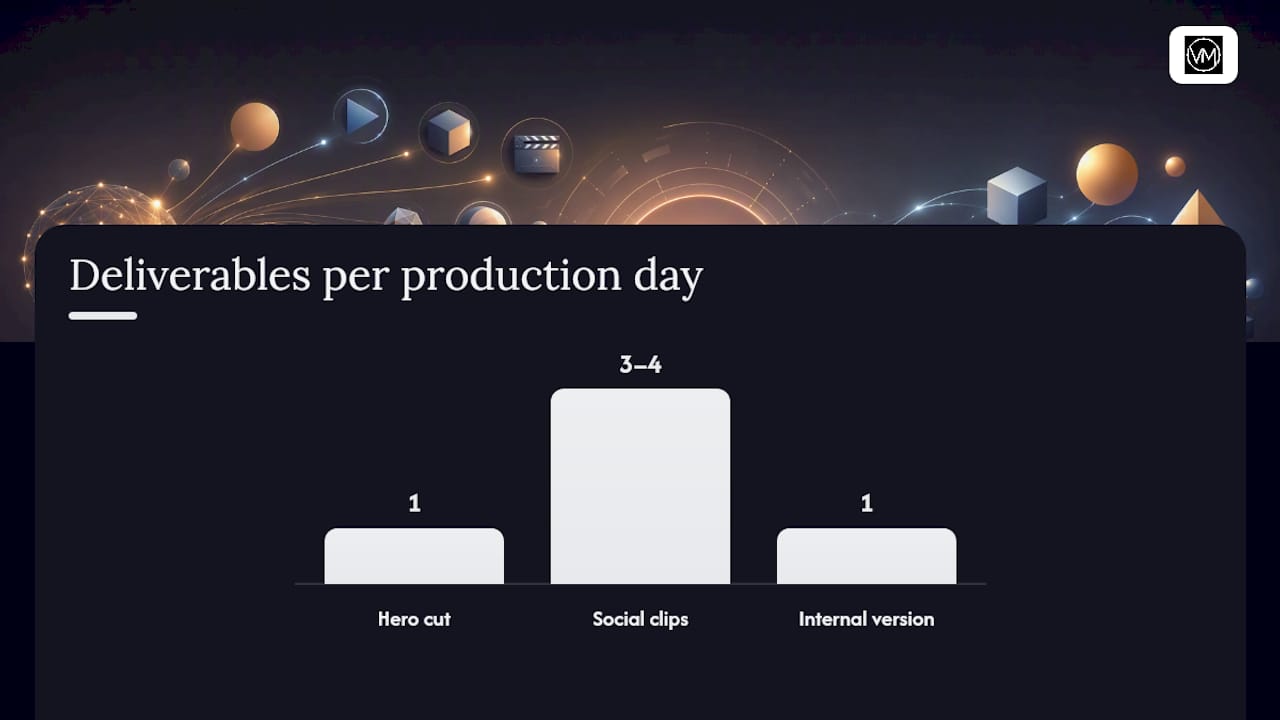
- Scope the repurposing plan before the shoot. One production day should generate a hero cut plus three or four social clips plus an internal version, not just one deliverable.
For a 90-day starter plan, commission one outward-facing format (usually a brand film or testimonial) in month one, cut social clips from that same footage in month two, and launch an inward-facing piece like a recruitment video or training module in month three once you've seen how the first project performs.
Before you commission anything, ask three questions: What decision should the viewer make after watching? Where will this live for the next 12 months? Who signs off on the final cut?
Pro Tip: Track view-through rate and click-through separately for the first 30 days. A high view-through with low click-through usually means the format is right but the call-to-action or placement is wrong, not the video itself.
Budgets, Length, and Getting More From One Shoot
Budget bands track roughly with production complexity rather than runtime alone. A low tier typically means single-camera, natural light, and a template edit. A mid tier adds a second camera, basic lighting, and a colorist pass. A high tier adds multi-camera coverage, custom color grading, and a director shaping the story rather than just documenting it.
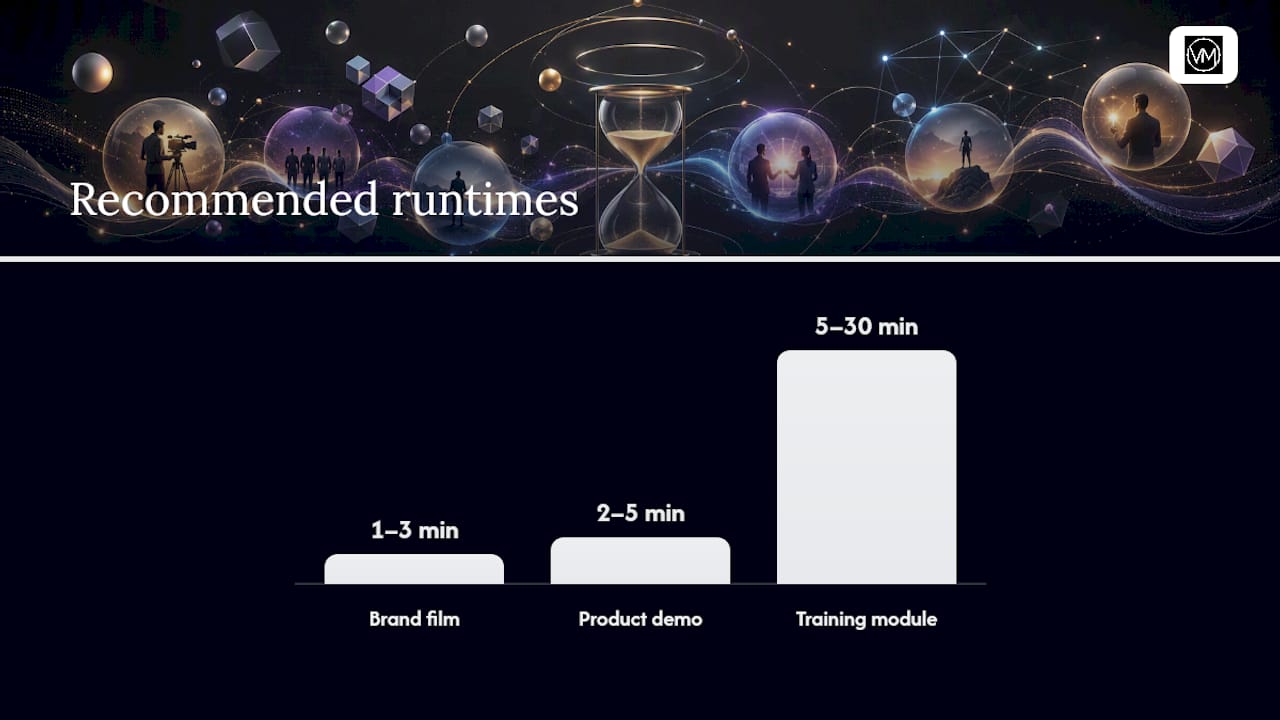
Length recommendations aren't arbitrary. Brand films commonly run from one to a few minutes, product demos run from a couple to several minutes, and training modules run several minutes to around half an hour per module., and each range reflects the platform's attention window as much as the content itself. Nobody watches a 10-minute brand film on Instagram, and nobody sits through a 60-second training module on a topic that needs real explanation.
A single well-planned shoot can produce several deliverables if you plan for it upfront:
- Request caption files and multiple aspect ratio masters (16:9, 9:16, 1:1) at the time of delivery, not as an afterthought.
- Build a shot list that captures b-roll specifically earmarked for social cuts.
- Treat captioning as a required deliverable, not an optional add. Accessibility compliance and mobile viewing habits both depend on it.
Creative Approaches That Actually Fit the Format
The creative treatment should follow the format's job, not the other way around. Testimonials build trust, animation handles complex product education, and brand films create the kind of shareable emotional resonance that drives organic reach.
- Brand film: cinematic story structure, real locations, minimal dialogue explaining the obvious.
- Explainer: animation plus voiceover, especially when the product has no physical form to film.
- Testimonial: interview setup plus b-roll of the client's actual environment, never a stock office.
- Low-budget alternative: a talking-head interview cut against b-roll footage, which reads as authentic rather than cheap when lit well.
- Event content built for a trade show floor benefits from the kind of short-form entertainment concepts that loop well on booth screens.
- Social-first edits need the hook in the first three seconds; website hero edits can afford a slower build.
How Visualize Media Approaches Corporate-Format Projects
Filmmaker-first means story and lighting come before coverage volume. We previsualize before we ever set up a tripod, build shot lists that maximize repurposing across formats, and run a clean on-set audio workflow so postproduction isn't fighting bad sound.
Our event and film case pages, Nestor & Elsa and ARYANA, show the cinematic treatment we bring to multi-camera coverage and color grading, without overselling what any single project scope includes.
Why Cinematic and Fast Templates Both Have a Place
Cinematic production earns its cost when the video's job is to move emotion, brand trust, or recruitment. Templated, faster output makes sense for internal comms and routine training. The simple rule: match production ambition to the size of the outcome you need, and always ask what the same shoot can repurpose into before you book the crew.
— Anthony
Ready to Plan Your Corporate Video With Visualize Media
A filmmaker's approach to corporate work, rather than a stock-footage template stitched together overnight, distinguishes standout brand films and event coverage through multi-camera setups, professional color grading, and a real narrative arc. If your team is weighing a brand film, an event recap, or a recruitment video and wants footage that still looks sharp a year from now, the Corporate production page outlines the kinds of projects we take on.
Not sure which format fits your budget or timeline? Reach out through the Visualize Media site for a portfolio review and estimate, and follow along on Instagram for behind-the-scenes looks at recent shoots and finished cuts.
Sources
- Types of Corporate Videos: A Field Guide by Goal
- Corporate video examples and format guidance
- Corporate Video: Types, Costs, and Use Cases (2026 Guide)
FAQ
How Many Types of Corporate Videos Are There?
Most guides count between seven and ten core types, split between outward-facing formats like brand films and demos, and inward-facing formats like training and internal comms.
What's the Difference Between a Brand Film and a Promo Video?
A brand film builds long-term emotional recognition and typically runs 60 to 180 seconds, while a promo video drives a short-term action and usually runs under 60 seconds with a harder call-to-action.
How Long Should a Corporate Training Video Be?
Training modules commonly run 2 to 30 minutes per module, scaled to how much a topic actually requires rather than a fixed target length.
Does Visualize Media Produce Corporate Videos?
Yes. Visualize Media offers corporate production services covering brand films and event coverage, detailed on its Corporate page, with pricing available on request.
What's the Biggest Mistake Companies Make Choosing a Video Format?
Picking a format before defining the KPI it needs to move, which producers describe as a common cause of wasted budget on the wrong type of video.