
Reserve camera lanes, request an unplugged ceremony, place entrance signs, assign an enforcement lead, and coordinate with every vendor the day before. Those five steps cover most situations where guests or objects end up blocking videographer shots. They work because they combine physical sightline management with social expectation-setting and active day-of oversight. No single tactic is enough on its own.
Quick reference:
- Reserve and mark camera lanes before guests arrive
- Ask the officiant to make a short unplugged announcement
- Place signs at the ceremony entrance and key aisle points
- Assign one person (planner, usher, or venue manager) to gently redirect guests
- Confirm vendor positions and lighting with your videographer 24 hours out
Key takeaways
Preventing blocked videographer shots comes down to five actions: reserved camera lanes, an officiant announcement, entrance signage, an assigned enforcement lead, and vendor coordination completed the day before.
| Point | Details |
|---|---|
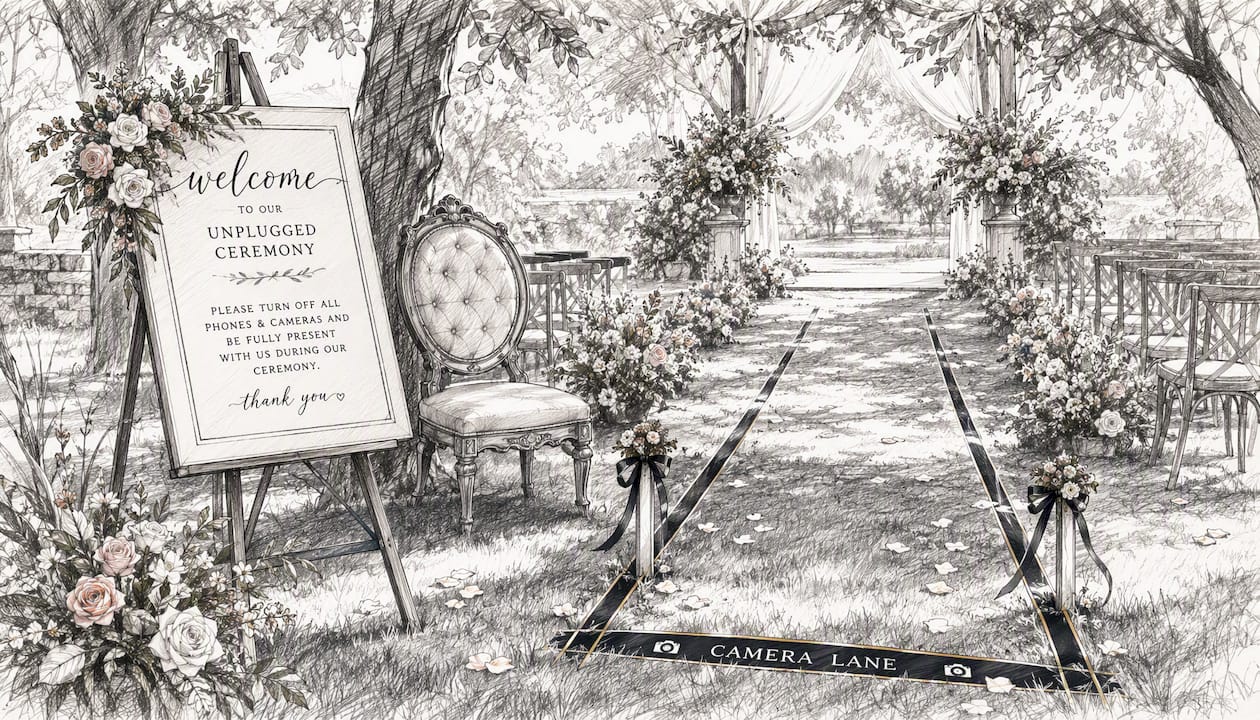
| Reserve camera lanes early | Mark a 3-foot lane from rear to altar before guests arrive; use ribbon or floor tape. |
| Officiant announcement is the strongest tool | A short unplugged request gets higher compliance than signs alone. |
| Assign a named enforcement lead | One person with two or three ready phrases prevents most aisle intrusions. |
| Multi-camera coverage is the safety net | A second angle saves moments that a single blocked camera cannot recover. |
| Visualizemedia covers NY and NJ | Their packages include multi-camera setups and pre-confirmed sightlines for luxury weddings. |
Day-of checklist: what to do in the final 48 hours
A time-ordered list keeps everyone accountable. Ownership matters as much as the task itself.
48–24 hours before:
- Confirm camera lane positions and backup angles with your videographer
- Share the final seating chart with the venue manager and planner
- Send the officiant the exact announcement wording you want used
- Confirm vendor call times (florist, DJ, photo booth) so no one sets up in a camera lane
24–4 hours before:
- Print and laminate entrance signs; hand them to the venue contact
- Brief ushers on where guests may and may not stand during the processional
- Confirm the officiant has the announcement script in hand
- Walk the ceremony space and check for cables, floral stands, or AV equipment that could drift into a shot
2 hours to ceremony:
- Place physical lane markers (ribbon, subtle floor tape, or a small rug)
- Remind the bridal party not to cluster at the altar sides
- Ask your videographer to confirm audio levels and camera positions are locked
- Do a final walk of the aisle from the camera's perspective
Pro Tip: Assign each task above to a named person in a shared notes app or printed sheet. "Someone will handle it" is how tasks fall through.
How to coordinate sightlines, camera positions, and lighting with your venue
A short vendor planning call, ideally two to three days before the wedding, is the single most efficient way to protect sightlines. Bring the videographer, planner, and venue manager into the same conversation and agree on three things: camera lane locations, backup positions if the primary lane gets crowded, and any lighting changes that affect exposure.
Recommended camera positions for common ceremony spaces:
- Center rear aisle: captures the processional and vows straight-on; reserve a 3-foot-wide lane from the last row to the altar
- Side aisle (45-degree angle): ideal for ring exchanges and first kiss; keep the front two rows on that side clear
- Elevated balcony or loft: removes the guest-blocking problem almost entirely for the wide shot; confirm access with the venue in advance
Cables and tripods are a frequent surprise. Ask the venue where power outlets are located and route cables along baseboards or under aisle runners, never across foot-traffic paths. A tripping hazard is also a camera-shake hazard. Unobtrusive filming techniques like elevated angles and a second shooter reduce the probability of blocked frames significantly, and they keep the crew's footprint small enough that guests rarely notice them.
Ask the venue these four questions before the day:
- Is balcony or loft access available for a camera operator?
- Can the front row(s) be reserved and marked before guests arrive?
- Where are the nearest power outlets to each camera position?
- Will the AV team adjust speaker placement if it blocks a sightline?
Crowd-control tactics like reserved front rows and assigned camera lanes materially reduce blocking incidents without requiring anyone to police guests in real time.
How to announce and enforce a phone-free ceremony
Entrance signage combined with a short officiant announcement is the most effective combination for getting guests to put phones away. Signs alone get ignored by about half the room. The officiant's voice gets everyone.
Sign wording options:
- "We invite you to be fully present. Please keep phones and cameras tucked away during the ceremony. Our videographer will capture every moment for you."
- "Unplugged ceremony. Phones away, hearts open."
Place one sign at the ceremony entrance and a smaller version at each end of the front two rows.
Officiant announcement (brief):
For guests who may need a partial exception (elderly relatives who livestream for family abroad, for example), add: "If you need to livestream for a family member who couldn't be here, please stay seated and keep your device low."
Add a line to your wedding website or RSVP: "We're having an unplugged ceremony. We'd love for you to be fully present with us. Our videographer will share the footage after the wedding."
Who enforces the plan and how a videographer should respond
Assign a specific enforcement lead before the day starts. A planner or head usher works well. They need a backup, typically a second usher or the venue manager. The videographer should not be the primary enforcer. Their job is to film, not manage crowd behavior.
Phrases that work without embarrassing anyone:
- "Hey, could you step back just a little? You're right in the camera's path."
- "The videographer needs this lane clear. Can I show you a great spot to stand?"
- "If you'd like to take a photo, the best view is actually from your seat."
When a guest steps into the frame during a key moment, a videographer has three options: reposition quickly to a backup angle, gently tap the guest's shoulder and point toward their seat, or accept the cover-up and cut to a reaction shot in the edit. The third option is a last resort, not a plan.
The viral TikTok clip posted by Joel de Vries (Smallroomvisuals) showed a videographer physically nudging a guest who had walked into the aisle. Newsweek reported the clip reached 2.1 million viewers and sparked a wide conversation about unplugged ceremonies. The takeaway isn't that videographers should nudge guests. It's that the situation is common enough to go viral, and a clear plan prevents it from happening in the first place.
Pro Tip: Brief your enforcement lead with a printed card listing their two or three phrases. Under pressure, people forget what to say.
Use rehearsal and seating to remove blocking opportunities
A 10 to 15 minute camera run during rehearsal is worth more than any sign. Walk the aisle from the rear camera position and mark where the front-row boundary falls. Use a small piece of ribbon or floor tape to show ushers exactly where guests should not stand.
Seating and staging rules that prevent blocked shots:
- Reserve the first one or two rows for immediate family; they are less likely to stand and photograph
- Keep wheelchair and elder seating at the aisle ends of middle rows, not the front corners where they drift into side-camera lanes
- Place ushers at the aisle ends of rows 3–5 during the processional so they can gently redirect anyone who stands
- Mark camera lane boundaries with a subtle floor ribbon or a small potted plant at each end
Practical crowd-control layout changes like these work because they remove the opportunity before it becomes a problem. You're not asking guests to behave differently; you're designing the space so the natural behavior doesn't cause an obstruction.
Preventing blocked shots during the reception
The ceremony gets most of the attention, but the first dance, toasts, and cake cutting are where guests crowd in with phones raised. A brief emcee or DJ announcement before each moment resets expectations.
Before the first dance: "We'd ask everyone to stay seated for the first dance so our videographer can capture it clearly. There'll be plenty of time for photos right after."
Keep a 6-foot camera lane clear on one side of the dance floor. Ask the DJ or planner to physically hold that lane until the song ends.
For toasts and speeches: Seat the speaker at a position the videographer has already framed. Ask guests to remain seated. A well-filmed speech depends as much on clear sightlines as it does on good audio.
For cake cutting: Position the cake table so the camera can shoot from a 45-degree angle without a crowd behind the couple. Ask the planner to hold guests back until the cut is done.
If a moment gets blocked: quick fixes and what editing can save
When a guest steps in front of the camera during the vows, the fastest fix is a second camera angle. This is why multi-camera coverage matters. One camera blocked doesn't mean the moment is lost if a second was rolling from a different position.
On-the-day options:
- Switch to the backup camera angle in the edit
- Ask the couple for a short replay (a second first kiss, a re-read of a vow line) if the primary take was fully obscured
- Use reaction shots of guests or the officiant as cutaways
- Reposition for the next key moment immediately
What editing can fix: cropping to reframe around a partial obstruction, cutting to a reaction shot, stabilizing a quick reposition, and speed-ramping a transition to cover a gap.
What editing cannot fix: a long, central obstruction during the vows with no second angle and no audio. That's a permanent loss. Keeping aisles clear also protects audio, since a guest standing near a lapel mic causes interference that no editor can remove cleanly.
Pro Tip: Ask your videographer before the wedding: "What's your backup plan if someone blocks the vows?" A professional should have a specific answer, not a vague one.
Copy-paste templates for couples and planners
Officiant announcement options
Formal: "Before we begin this ceremony, [Name] and [Name] kindly ask that you put away all phones and cameras. Their videography team is capturing every moment, and your full presence is the greatest gift you can offer them today."
Casual: "Quick note from the couple: phones away, please! Their videographer has got you covered, and they really want to see your faces, not your screens."
Partial unplugged: "[Name] and [Name] ask that you keep phones put away during the ceremony itself. After the recessional, feel free to take as many photos as you'd like."
Entrance sign texts
- "Unplugged ceremony. Our videographer is capturing every moment. Please keep phones away and simply enjoy being here."
- "Phones down, hearts open. We'll share the film with you soon."
Usher script (one sentence)
"Hi, could I ask you to step back from the aisle? The camera needs this lane clear, and I can find you a great spot to stand."
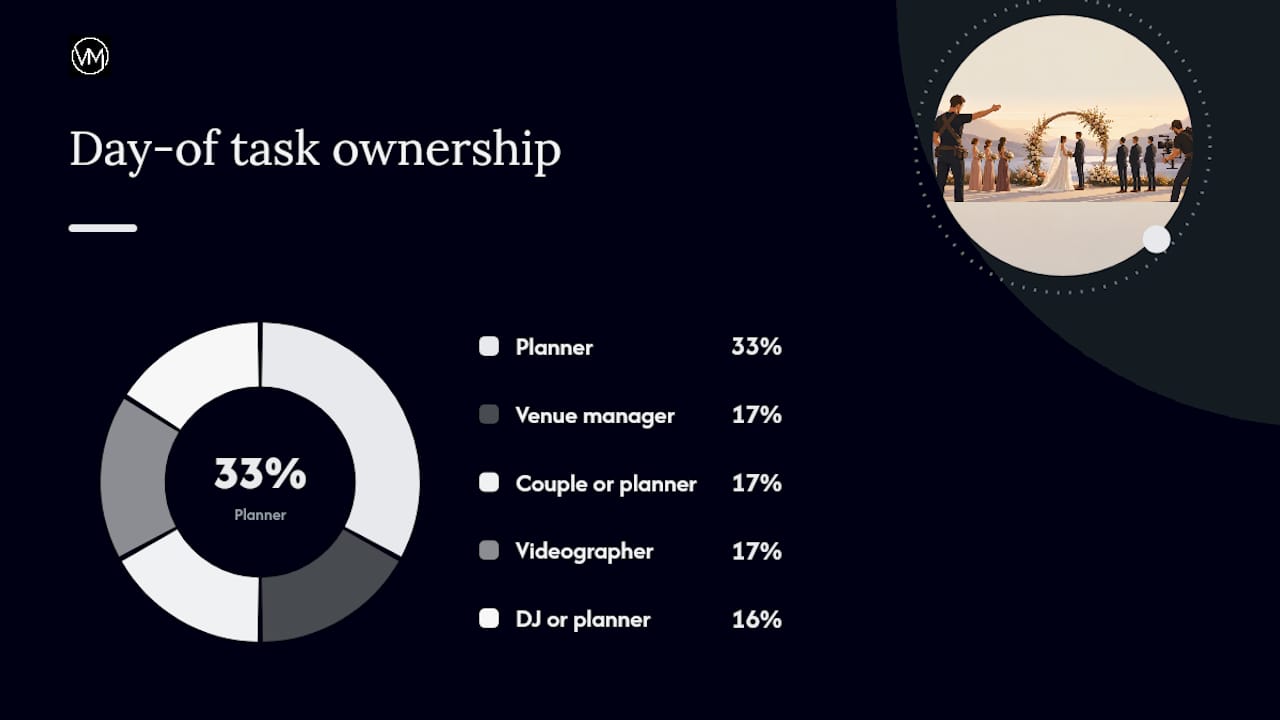
Day-of checklist (owners assigned)
| Task | Owner |
|---|---|
| Confirm camera lanes with videographer | Planner |
| Place entrance and aisle signs | Venue manager |
| Brief ushers on lane enforcement | Planner |
| Deliver announcement script to officiant | Couple or planner |
| Check videographer setup and audio | Videographer |
| Hold camera lane during first dance | DJ or planner |
A note from a working wedding videographer
The moment couples most often lose to a blocked shot isn't the vows. It's the first kiss. A well-meaning aunt steps into the aisle with her phone raised at exactly the wrong second, and the primary angle is gone. A second camera saves it. But the second camera only helps if it was positioned before the ceremony started, not scrambled into place when the problem appears.
Two things surprise couples most: how fast key moments happen, and how far a phone screen extends into a frame. A guest three rows back, holding an iPad at shoulder height, can block a rear camera's view of the altar entirely. The fix isn't to ask guests to behave better in the moment. It's to design the space so the behavior doesn't reach the camera.
One more thing worth saying: Super 8-style footage, whether shot on actual Super 8 film or recreated digitally, is particularly sensitive to foreground obstructions. The grain, the shallow depth of field, and the tight compositions that make Super 8 inserts so beautiful at weddings also mean a single object in the foreground reads as a hard visual break. There's no cropping it out cleanly. If your videographer is incorporating Super 8 aesthetic elements, keep those specific moments, typically the processional and first kiss, as tightly controlled as possible.
Follow Visualizemedia's work on Instagram for real examples of how these techniques look in finished films.
Visualizemedia captures what no retake can recreate
Hiring a team that arrives with a multi-camera plan, a second shooter, and pre-confirmed camera lanes removes most of the blocking risk before the day starts. Visualizemedia's wedding cinematography packages include multi-camera coverage, aerial drone footage, and full ceremony edits for couples in New York and New Jersey. The team coordinates vendor positions, confirms sightlines during setup, and carries backup angles for every key moment so a single blocked shot doesn't become a permanent gap in your film.

See the portfolio and check availability at Visualizemedia, or follow the team on Instagram to see how cinematic coverage looks when nothing gets in the way.
Sources
- Videographer clip sparks unplugged wedding discussion — Newsweek
- Unplugged Wedding Ceremony: How to Ask Guests to Put Their Phones Away | Plan A Wedding
- How to Stop Guests Blocking Photographer: Practical Wedding and Event Crowd-Control Tactics