
A filming run-of-show is a camera-first, owner-assigned, minute-by-minute master document that tells every crew member exactly what to capture, when, and with which gear. Unlike a standard event agenda, it guarantees that production can execute without guessing. Every missed shot at a live event traces back to the same root cause: someone relying on the organizer's schedule instead of a purpose-built filming document.
Here is the copy-ready checklist to start building yours right now:
- Time and duration for every segment (start time + segment length in minutes)
- Named owner for each cue (never use "event team")
- Camera assignments (Camera A, B, C with positions)
- Shot list per segment (wide establishing, tight close-up, cutaway)
- Audio source and patch point (lav, podium mic, house feed)
- Lighting cue (preset number or description)
- Slides/video playback source and operator
- Contingency column with a named backup for every technical element
- Call time vs. start time listed separately
- Version number and distribution list on every page
Pro Tip: Assign a single named person to verify every contingency backup during load-in. If no one owns the check, no one does it. Add a "verified by" column next to each contingency row and require a signature or initials before doors open.
How does a filming run-of-show differ from an organizer's agenda?
An organizer's agenda keeps guests informed, whereas a filming run-of-show tells camera crews how to capture the show. These are different documents, and failing to distinguish them is a common production mistake at live events.
Bizzabo notes that an organizer's agenda is essentially a brief. Production needs its own specialized document tailored to camera and audio requirements. The agenda might say "9:00 AM — Welcome remarks." The filming ROS says: Camera A on a tight two-shot at the podium, Camera B wide from the back-left riser, lav mic on speaker, lighting preset 3, slides operator on standby, cue AV at 8:58 AM.
Three things that get missed when crews rely on an organizer's agenda:
- Signal flow details. Which mic feeds which recorder? Where does the house audio split? An agenda never answers this.
- Camera blocking windows. Crews need repositioning time between segments. Agendas skip it entirely.
- Technical ownership. Who calls the slide advance? Who confirms the livestream is recording? Agendas assign no one.
The immediate production benefits of a proper filming ROS:
- Reduces on-the-fly decisions during high-pressure moments
- Creates a single source of truth every crew member references
- Cuts post-production confusion about which camera covered which segment
- Gives the stage manager and lead AV tech a shared cue language
What inputs do you need before drafting the filming schedule?
Drafting before you have the right inputs produces a document you will rewrite three times. Collect everything below before you open a spreadsheet.
Documents and assets to request:
- Full organizer agenda with confirmed segment times
- Speaker scripts or talking points (critical for timing estimates)
- Slide decks and video playback files with confirmed run times
- Venue floor plan with power, rigging, and camera position options
- Site technical specs (house audio system, patch panel layout, screen resolution)
- Streaming platform access credentials and encoder settings
People to confirm and contact:
- Stage manager (owns cue calls on show day)
- Lead AV technician (owns signal flow and patch)
- Production manager or event director (owns schedule changes)
- Streaming engineer (owns encoder, failover, and platform monitoring)
- Venue technical contact (owns house systems and access)
- Client lead (owns final approval on schedule and deliverables)
Equipment and resource list:
- Camera types and lens kits per operator
- Audio patching diagram (inputs, splits, recorder destinations)
- Comms system (wireless channels, talkback assignments)
- Spare batteries, media cards, and swap schedule
- Backup recording devices and their locations
A one- to two-page videography brief should be delivered to the videographer at least two weeks before the event. That brief becomes the foundation for the filming ROS.
| Input | When to request it |
|---|---|
| Organizer agenda (draft) | 3–4 weeks before event |
| Speaker scripts / run times | 2–3 weeks before event |
| Slide decks and video files | 1–2 weeks before event |
| Venue floor plan and tech specs | 2–3 weeks before event |
| Streaming credentials and encoder settings | 1 week before event |
| Final confirmed agenda (locked) | 48 hours before event |
What exact fields must a filming run-of-show include?
A production-ready ROS functions as the master reference for the entire crew. Every column earns its place by answering a question a crew member would otherwise have to ask out loud during the show.
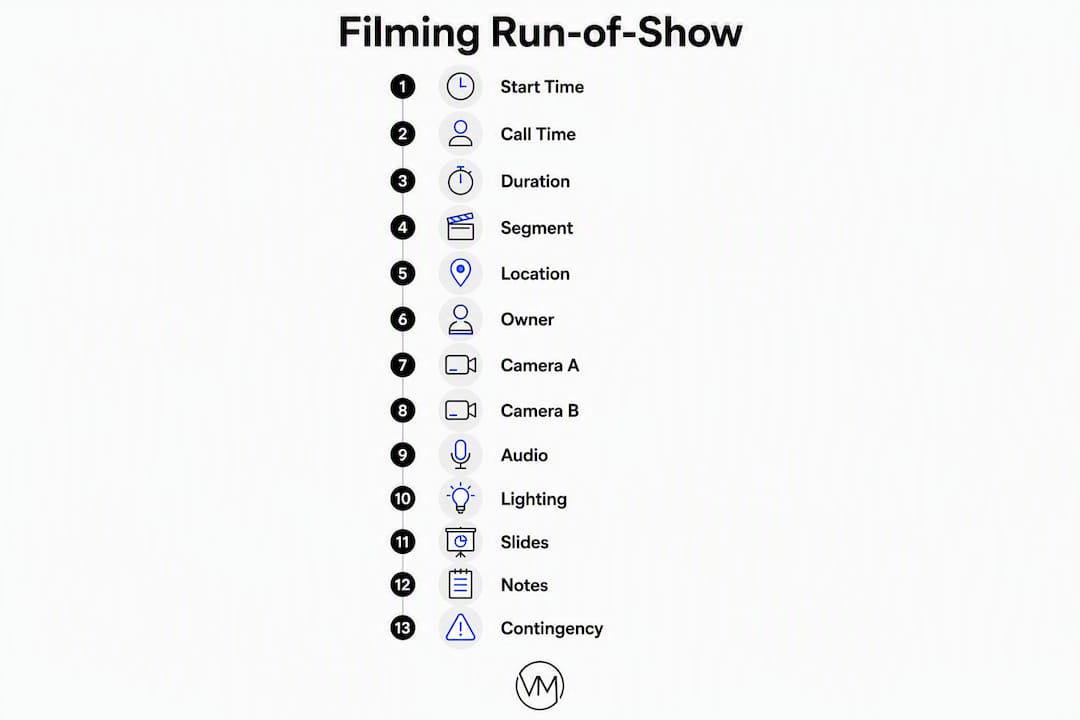
| Column | Why it exists | Example value |
|---|---|---|
| Start time | Anchors the crew to clock time | 9:00 AM |
| Call time | Crew arrival before segment begins | 8:58 AM |
| Duration | Segment length for buffer planning | 20 min |
| Segment name | Identifies the moment | CEO Keynote |
| Location / stage | Tells crew where to be | Main Stage, Center |
| Owner | Named person responsible for the cue | Sarah (Stage Mgr) |
| Camera A | Primary camera assignment and position | Tight podium, Stage Right |
| Camera B | Secondary coverage | Wide room, Back Riser |
| Shot list | Specific shots required | Open wide, push to tight at applause |
| Audio source | Mic type and patch point | Lav mic, Channel 3, split to Zoom H6 |
| Lighting cue | Preset or instruction | Preset 7, warm wash |
| Slides / playback | Source and operator | Keynote on MacBook, AV Tech (Mike) |
| Notes | Anything crew needs to know | Speaker uses teleprompter, no podium |
| Contingency | Named backup if primary fails | Backup lav on belt, Camera C on tripod |
Here is how three typical rows look when fully filled for a camera team:
Welcome segment (9:00 AM, 5 min): Camera A tight on host at podium; Camera B wide room shot capturing audience reaction. Lav on host, house feed to recorder. Lighting preset 1. No slides. Owner: Jamie (Floor Director).
Keynote (9:15 AM, 45 min): Camera A starts wide, pushes to tight at the 5-minute mark and holds through Q&A. Camera B covers audience cutaways and screen content. Lav plus podium mic, both channels recorded. Lighting preset 7. Slide operator: Mike (AV). Contingency: backup lav taped to podium.
On-stage demo (10:05 AM, 20 min): Camera A handheld for product close-ups; Camera B locked wide to capture full stage. Audio from demo device via direct line, Channel 5. Lighting preset 9 (bright, even). Slides: demo laptop, HDMI direct. Owner: Chris (AV Lead). Contingency: screen-capture recording running on backup laptop.
Pro Tip: Build the ROS so it can be filtered by role. Camera operators see camera columns; audio sees audio columns; stage managers see timing and cue owners. A color-coded spreadsheet with role-based tabs cuts confusion at load-in.
How do you build the filming run-of-show step by step?
Follow this sequence from raw inputs to a locked, distributed document. Production planning typically begins 2–4 weeks before the event, with event-day setup running 2–4 hours.
- Gather all inputs (see the inputs section above). Do not start mapping until you have the locked agenda, floor plan, and tech specs.
- Map anchor moments first. Identify the non-negotiable shots: ceremony vows, keynote opening, award presentations, first dance. These are the moments the ROS is built around.
- Work backwards from each anchor. Add call times, camera positioning windows, and lighting preset changes before each anchor segment.
- Assign a named owner to every cue. Vague owners like "event team" increase single-point-of-failure risk during high-pressure live events.
- Map signal flow. Document every audio input, patch point, recorder destination, and redundant path. Build the contingency column from this map.
- Add shot calls and camera run sheets. Create a separate one-page sheet per camera operator listing their camera ID, lens choice, primary shots, secondary coverage, movement windows, and battery/media swap schedule.
- Review with AV and stage manager. Walk the document line by line. Catch conflicts before they become show-day problems.
- Add buffers deliberately. At minimum, include at least 5 minutes between segments and build in a 10–15 minute recovery buffer every two hours.
- Version and lock the document. Name it with a version number and date (e.g.,
ROS_EventName_v3_2026-03-14). Distribute the locked version 48 hours before the event.
Dependencies to validate before locking:
- All segment run times confirmed by speakers or organizer
- Audio patch diagram signed off by lead AV tech
- Camera positions approved and physically scouted
- Streaming encoder tested and failover confirmed
- All contingency owners briefed and confirmed
What should you run during rehearsals and on show day?
Rehearsal is where the ROS gets stress-tested. A document that looks clean in a spreadsheet can fall apart the moment a speaker runs long or a lighting cue fires late.
Technical rehearsal (1–2 days before): Full tech run with all cameras, audio, and lighting. Every cue fires in sequence. The stage manager calls each cue from the ROS while the crew executes. This is the only session where you can catch a wrong camera position or a missing audio split without it costing you a shot.
Camera blocking session: Camera operators walk each segment, confirm positions, and rehearse any movement cues (push-in on applause, reposition between segments). Add any repositioning time you discover back into the ROS.
Dress rehearsal (day-of or evening before): Full run at show speed. Streaming engineer confirms the encoder is recording and the failover path is live.
Show-calling protocol on the day:
- Timekeeper monitors clock and calls "5 minutes to [segment]" over comms
- Stage manager calls each cue from the ROS verbatim
- Camera operators confirm position on comms before each segment begins
- AV tech confirms audio feed is live before each speaker takes the stage
- Streaming engineer confirms recording status at the top of every hour
Day-of checklist from load-in to pack-down:
- Camera checks: white balance, exposure, focus confirmation at each position
- Audio patch: every channel tested and levels set
- B-roll capture windows: identify and mark in the ROS (pre-show crowd, setup, detail shots)
- File backups: redundant recording confirmed running on all cameras
- Printed copies at stage manager and AV positions (digital master stays shared)
Maintaining a single shared digital master plus printed copies at key positions prevents day-of confusion when technology fails.
Pro Tip: Run a live-stream failover drill during the dress rehearsal. Disconnect the primary encoder intentionally and confirm the backup takes over within 30 seconds. If no one has practiced the switch, it will not happen cleanly under pressure.
Printable filming checklist and one-page ROS template
Pre-show filming checklist:
- ROS distributed to all crew (version-locked, dated)
- Printed copies at stage manager and AV positions
- All camera positions scouted and confirmed
- Audio patch diagram reviewed with AV lead
- Contingency owners briefed and confirmed
- Streaming encoder tested; failover confirmed
- Battery and media card swap schedule in each camera run sheet
- B-roll windows marked in ROS
- Segment run times confirmed with organizer
- Comms channels assigned and tested
One-page ROS template (paste into Google Sheets or Excel):
| Time | Call Time | Duration | Segment | Location | Owner | Cam A | Cam B | Audio | Lighting | Slides | Notes | Contingency |
|---|---|---|---|---|---|---|---|---|---|---|---|---|
| 9:00 AM | 8:58 AM | 5 min | Welcome | Main Stage | Jamie | Tight podium | Wide room | Lav Ch3 | Preset 1 | None | — | Backup lav on belt |
| 9:15 AM | 9:05 AM | 45 min | Keynote | Main Stage | Sarah | Wide → tight | Audience cuts | Lav + podium | Preset 7 | Mike (AV) | Teleprompter | Cam C on tripod |
| 10:05 AM | 10:05 AM | 20 min | Demo | Main Stage | Chris | Handheld close | Wide stage | Direct line Ch5 | Preset 9 | Demo laptop | — | Screen capture backup |
Versioning and distribution:
Name every file with the format ROS_[EventName]_v[#]_[YYYY-MM-DD]. Distribute via a shared Google Drive folder with view-only access for crew and edit access only for the production manager. Lock the document 48 hours before the event. Any post-lock changes get a new version number and a change log entry at the top of the document.
What mistakes do teams make, and how do you plan for failures?
The most expensive mistakes happen before the event starts, not during it.
Common mistakes:
- Vague ownership. "AV team handles audio" means no one handles audio when something breaks.
- No timing buffers. Back-to-back segments with zero transition time guarantee a missed shot when a speaker runs 90 seconds long.
- Missing audio patch details. Knowing a lav mic exists is not enough. Which channel? Which recorder? What is the backup if the transmitter drops?
- Wrong slide source. The ROS says "AV laptop," but the speaker brought their own MacBook. No one checked.
- Single-version distribution. Crew members working from different versions of the ROS are guaranteed to cause coordination failure.
Contingency checklist:
- Audio dropout: backup lav taped to podium, named operator confirmed
- Camera failure: Camera C on tripod as hot spare, operator assigned
- Slide failure: speaker has PDF backup on USB, AV tech confirmed
- Speaker delay: 10–15 minute buffer built into ROS after each major segment
- Streaming loss: backup encoder on standby, streaming engineer owns the switch
Documenting contingency in the ROS: The contingency column sits at the far right of every technical row. Format it as: [Backup device/path] — [Named owner]. Example: Backup lav on belt — Chris (Audio). That way, when something fails, the person calling the fix does not need to ask who owns it.
Pro Tip: During load-in, have the contingency owner physically touch and confirm every backup. A backup lav that is still in a case is not a backup. Require verbal confirmation over comms: "Backup audio confirmed, Chris." Log it in the ROS.
Key Takeaways
A production-ready filming run-of-show requires named owners on every cue, camera-specific columns, built-in buffers, and a locked, versioned document distributed at least 48 hours before the event.
| Point | Details |
|---|---|
| Owner assignment is non-negotiable | Every cue needs a named person; "event team" is not an owner and creates failure risk. |
| Camera-first columns separate the ROS from an agenda | Add camera position, shot list, and audio patch columns that organizer agendas never include. |
| Rehearsal stress-tests the document | Run a full tech rehearsal and camera blocking session to catch conflicts before show day. |
| Version control prevents crew confusion | Name files with version number and date; lock the document 48 hours out and log any changes. |
| Visualizemedia brings production-grade ROS execution | For weddings and events in New York and New Jersey, Visualizemedia's multi-camera crews operate from detailed filming run-of-show documents built around your event's specific moments. |
Why the filming ROS is the most underused tool in event production
Most event teams spend weeks on logistics and about 45 minutes on their production document. That imbalance shows up on screen. A keynote that cuts to the wrong camera angle, a first dance with no audio backup, a live stream that drops during the vows — these are not bad luck. They are the direct result of a filming document that was never built camera-first.
The piece most teams miss is signal flow. They assign cameras and shots, then forget to trace the audio path from the speaker's mouth to the recorder. Building the ROS from signal flow inward and including a contingency column for each technical row is the single practice that separates crews that recover from failures from those that freeze.
For wedding shoots, one creative choice worth building into the ROS explicitly is Super 8 film. Analogue inserts require their own call times for film loading and unloading, a light-metering window before the ceremony, and a designated operator who is not also covering a primary camera angle. Super 8 also runs a separate post workflow from digital footage, so note that in the ROS too. When it works, the grain and warmth of Super 8 against clean digital footage creates a texture no color grade fully replicates. But it only works when it is planned, not improvised.
For behind-the-scenes examples of how a production-grade filming approach translates to the final film, follow @visualizemedia on Instagram.
Visualizemedia brings full production support to your event film
Couples and event planners in New York and New Jersey who want a production-grade filming experience without building the infrastructure themselves work with Visualizemedia. The team arrives with a camera-first run-of-show already built around your event's specific moments, multi-camera coverage, aerial drone footage, and professional color grading handled in-house.
The problems this article describes — vague ownership, missing audio patch details, no contingency plan — are exactly what Visualizemedia's on-site production approach is designed to prevent. Every shoot includes a pre-event briefing, a locked filming ROS distributed to the full crew, and a dedicated production manager who owns show-calling on the day.
For weddings and events, the process starts with a production consultation where your timeline, venue, and key moments are mapped into a filming schedule before the crew ever arrives on site. Reach out to book your consultation and get a production-ready plan for your event.
Useful sources and templates for further reading
- How to Create a Run of Show — XTimer: Step-by-step ROS guide with timing and owner-assignment best practices; use as a drafting reference.
- Run of Show Templates, Examples & Complete Guide — Run Sheets: Downloadable templates and column-by-column guidance; use for call time vs. start time structure.
- Run of Show Guide for Event Organizers — Events.com: Covers owner assignment and single-point-of-failure prevention; use for crew briefing prep.
- Video-Friendly Run Sheet for Brand Events — Epitome Collective: Camera-specific run sheet guidance with shot type and movement window advice.
- Run-of-Show Misconceptions — Bizzabo: Explains why production needs its own ROS separate from the organizer's agenda.
- How to Plan an Event Video — Storyflow: Signal-flow-first planning approach and contingency column methodology.
- Essential Event Video Elements — Visualizemedia Blog: Production timeline construction and technical checklist items for live event filming.
- Why Plan a Videography Timeline — Visualizemedia Blog: Timeline benefits and handoff tips for wedding shoots.